Apple Pay.
Now with your PAYALLY card.
Faster. Safer. Effortless. Everywhere you go.
What this means for you
Instant contactless payments.
Pay with a glance or a touch —
on iPhone or Apple Watch.
Advanced security.
Your card number is never shared. Every transaction
is protected with Face ID, Touch ID, or passcode.
One-time setup.
Add your PAYALLY card to Apple Wallet once.
Then checkout becomes effortless, everywhere Apple Pay is accepted.
How to set it up
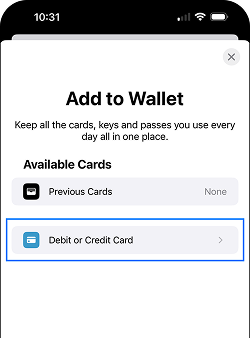
In Apple Wallet:
1. Open the Wallet app on iPhone.

2. Tap the “+” button.

3. Select “Debit or Credit Card” and follow the instructions.
In the PAYALLY app:
1. Open the PAYALLY app.

2. Go to the “Cards tab” and select your card.

3. Tap “Add to Apple Wallet” and follow the instructions.

Find places that accept Apple Pay
You can use Apple Pay where you see contactless payment symbols such as the following:

Use Face ID or Touch ID to authenticate contactless payments in stores

The smarter way to pay
With PAYALLY and Apple Pay, every checkout is faster, safer, and more seamless than ever.